sales@north-bridges.com
86-13862120662
Which USRP Software Is Right for You?
Overview
If you’re planning to develop a wireless application and need to select a software defined radio (SDR), you may have a few questions additionally, such as:
- What software development tool should I use?
Let's take the respected industry giant NI as an example to explain the key differences between various USRP models and can help you select the right radio.
What is a USRP?
Universal Software Radio Peripherals, or USRPs, are a family of soft-defined radios made by NI.
Software defined radios are wireless devices commonly used for wireless research prototyping and deployed applications. SDRs are commonly used for communications, next-gen radar, electronic warfare (EW), over-the-air (OTA) test, and 5G research.
For host application code development, engineers use these common tools:
- LabVIEW
- C/C++ or Python with open-source hardware drivers
- Open-source SDR frameworks like Redhawk or GNU Radio
- MathWorks® MATLAB® software and Wireless Testbench™ software
The software development tool and operating system can determine which radio is ideal for your application.
Many applications require signal processing hardware acceleration with an FPGA device. Several USRPs offer this capability, and there are many options for FPGA development, as discussed later in more detail.
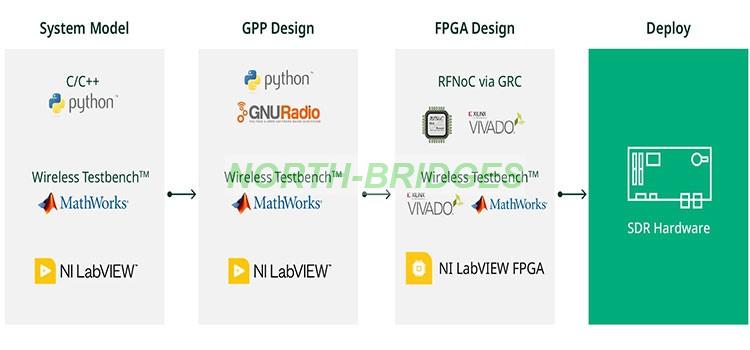
Figure 2 depicts an overview of common tool flows for software and FPGA development available on the USRP.
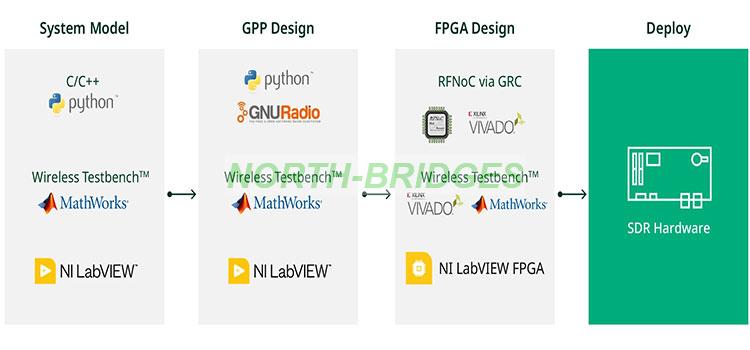
Figure 2: Software and FPGA Options for SDRs
Selecting USRP Software
Programmability is the key feature of an SDR, enabling one to take a radio peripheral and turn it into an advanced wireless system. The USRP is the most open and versatile SDR on the market, helping engineers to build systems with a wide variety of software development tools on both the host and on the FPGA.
Host Programming Considerations
As shown in Figure 2 above, there are a variety of options to program the host of an SDR-based system.
Programming on LabVIEW with NI-USRP Driver
LabVIEW is a graphical data flow programming environment well-suited for designing and implementing communications algorithms. At the most fundamental level, LabVIEW uses the NI-USRP driver to both specify USRP hardware configuration and send and receive properly formatted baseband I/Q data ready for host-side signal processing.
If LabVIEW is your preferred development environment, it should be noted that although it does have some Linux-based OS support, it’s predominantly a Microsoft Windows-based tool. Additionally, some Ettus Research USRP models and configurations may not be supported; see Table 1.
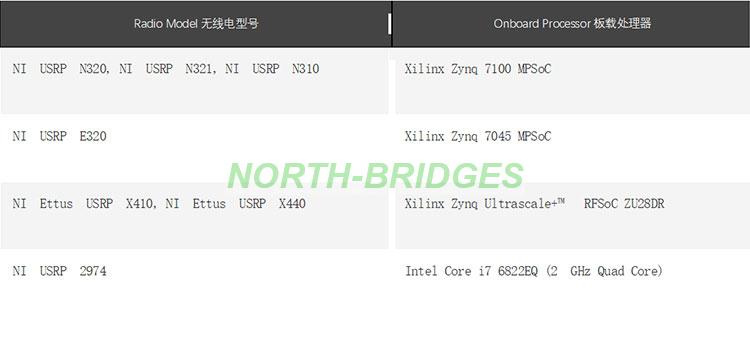
Table 1: Stand-Alone-Capable USRP Models with Onboard Processors
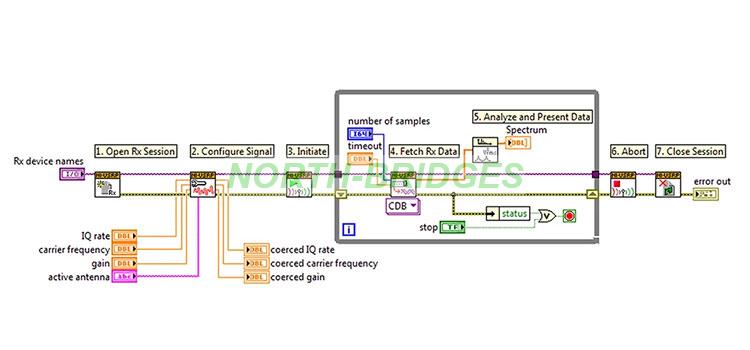
Figure 12: LabVIEW Block Diagram with the NI-USRP Driver API
Programming with Open-Source Workflows: USRP Hardware Driver (UHD) and GNU Radio
Many SDR users prefer to program USRP hardware with text-based and open-source tool flows built on C/C++ and Python. All NI and Ettus Research USRP models support the USRP hardware driver (UHD), allowing for easy integration to open-source community developed tools such as GNU Radio.
GNU Radio is an open-source tool built solely for SDR developers.
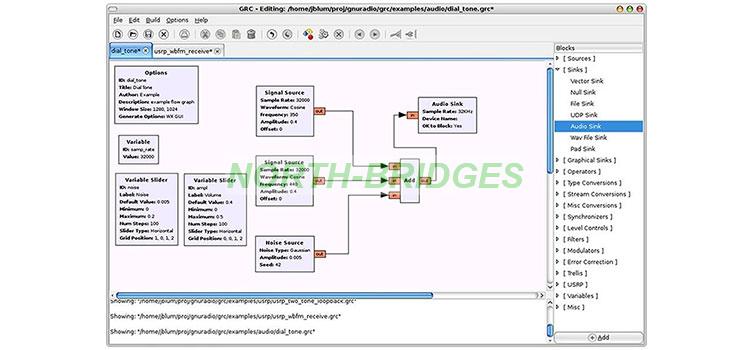
Figure 13: GNU Radio Companion Flow Graph
Programming with MATLAB
If MATLAB is your preferred tool for programming, MATLAB and MathWorks Simulink™ software connect to the USRP family of software defined radios to provide a radio-in-the-loop environment as well as support different USRP models through different add-on solutions.
USRP N3xx, X3xx, and X4xx are supported by Wireless Testbench, which offers support for testing wideband wireless systems and spectrum monitoring, featuring high-speed data transmission and capture. Wireless Testbench also enables you to integrate custom IP blocks such as filters, synchronizers, and more with RF Network-on-Chip (RFNoC™) into the signal processing chain on the USRP FPGA (with MathWorks HDL Coder™).
USRP N2xx and B2xx devices are supported by MathWorks Communications Toolbox™, enabling the design and prototyping of SDR systems. This support enables you to transmit and receive over-the-air signals with MATLAB and Simulink, aiding transceiver design and enabling waveform testing.
USRP E310 device support is provided by Communications Toolbox, facilitating the prototyping and testing of SDR systems. This support enables HDL code generation for the E310, enabling the deployment of wireless systems on this radio.
FPGA Programming Considerations
Many USRPs come equipped with a large FPGA with sufficient free capacity to allow users to embed inline signal processing specific to their application. As described in the hardware section, some USRPs come equipped with Xilinx Zynq SoC devices and some with traditional fabric FPGAs such as the Kintex 7. There are two ways to gain access to the FPGA on USRPs: LabVIEW FPGA and the RF Network on Chip (RFNoC) framework.
Unlike many FPGA development boards or COTS FPGA boards, USRPs are built on a common FPGA framework and provide a higher-level abstraction. This removes some of the complexity encountered when building an FPGA-based system from a bare-bones FPGA board support package.
LabVIEW FPGA
LabVIEW FPGA is an add-on extension for LabVIEW that allows graphical programming of the FPGA on NI USRP RIO devices. Although users must be familiar with FPGA concepts such as fixed-point math and clocked logic, LabVIEW abstracts hardware and data interfaces and simplifies register configuration and data movement. An advantage of LabVIEW FPGA is the ability to program both the host and FPGA with a unified development tool chain.
Do you have legacy IP you’d like to leverage? LabVIEW FPGA can import external VHDL or Verilog through Component Level IP (CLIP) nodes, allowing for non-LabVIEW IP to be imported. Additionally, LabVIEW allows for Xilinx Vivado project export for expert users working within the Vivado tool directly.
If LabVIEW FPGA is your tool of choice for host programming, note that it is limited to Windows-based operating systems. Many Ettus Research devices such as the USRP N300 and USRP E300 series are not supported under LabVIEW or LabVIEW FPGA. See Table 3 for a complete list.
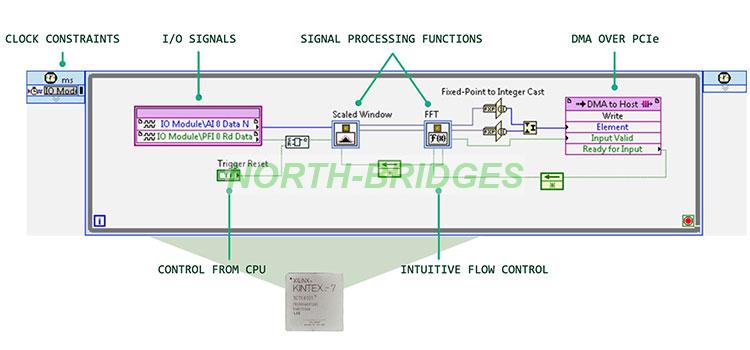
Figure 14: Simple LabVIEW FPGA Block Diagram
RF Network on Chip (RFNoC) Framework
For open-source USRP users, the preferred way to program the FPGA is through the RFNoC Framework. RFNoC, like LabVIEW FPGA, is a data interface and command abstraction framework to simplify adding IP to your USRP without having to rebuild the entire FPGA board support package. As the name suggests, data flows through the FPGA from the radio as a compressed header network package. At the heart of the RFNoC framework is a crossbar interface allowing the user to plug new IP into the crossbar and route data to other IP blocks or to and from the host machine. This network crossbar design removes the complexity of passing data and commands to and from the host.
If working in Vivado and using RFNoC is your preferred path to program the FPGA of your USRP, consider the USRP X300 series, USRP E300 series, USRP N300, or the Ettus USRP X410 or X440 for your application.
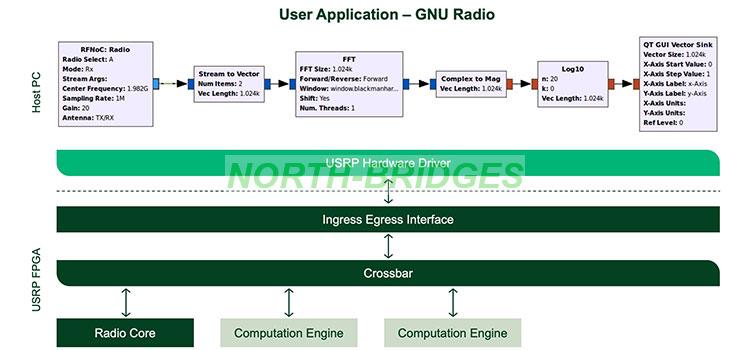
Figure 15: RFNoC Conceptual Block Diagram Integrated with GNU Radio
RF Network on Chip (RFNoC) Framework
Deploy custom SDR algorithms on the FPGA of an NI USRP radio using a Simulink workflow. Run and verify your design using MATLAB objects and functions.
Summary of USRP Hardware and Software
Table 3 shows a matrix view of different USRP hardware and supported software
Type | NI USRP Model | NI Ettus USRP Model | #Tx | #Rx | Frequency Range | BW | LabVIEW | LabVIEW FPGA | OSS-UHD | OSS-FPGA | Wireless Testbench |
Stand-Alone, FPGA Enabled High Performance | USRP X440 | 8 | 8 | 30 MHz - 4 GHz | 1.6 GHz | — | — | ||||
USRP X410 | 4 | 4 | 1 MHz - 7.2 Ggz | 400 MHz | |||||||
N/A | USRP N320, USRP N321 | 2 | 2 | 3 MHz - 6 GHz | 200 MHz | — | |||||
N/A | USRP N310 | 4 | 4 | 10 MHz - 6 GHz | 100 MHz | — | |||||
USRP-2974 | N/A | 2 | 2 | 10 MHz - 6 GHz | 160 MHz | — | |||||
Host Connected, FPGA Enabled, High Performance | USRP-2944 | USRP X310 + UBX | 2 | 2 | 30 MHz - 6 GHz | 160 MHz | |||||
USRP-2945 | USRP X310 + TwinRX | 0 | 4 | 10 MHz - 6 GHz | 80 MHz | ||||||
USRP-2954 | USRP X310 + UBX + GPSDO | 2 | 2 | 30 MHz - 6 GHz | 160 MHz | ||||||
USRP-2955 | USRP X310 + TwinRX +GPSDO | 0 | 4 | 10 MHz - 6 GHz | 80 MHz | ||||||
NA | USRP X310 + OBX | 2 | 2 | 10 MHz–8.4 GHz | 160 MHz | — | — | ||||
Low SWAP Stand Alone Embedded | N/A | USRP E320 | 2 | 2 | 70 MHz - 6 GHz | 56 MHz | — | — | — | ||
Low SWAP Low Cost USB Connected | N/A | USRP B206mini | 1 | 1 | 70 MHz - 6 GHz | 56 MHz | — | — | — | ||
USRP-2900 | USRP B200 | 1 | 1 | 70 MHz - 6 GHz | 56 MHz | — | — | — | |||
USRP-2901 | USRP B210 | 2 | 2 | 70 MHz - 6 GHz | 56 MHz | — | — | — | |||
Table 3. USRP Hardware and Supported Software
Key Takeaways on USRP Selection
SDRs are powerful tools for wireless research, design, prototyping, and deployment. Many options exist, and choosing the right radio for your application has many considerations. However, with a careful assessment of the various software and hardware factors outlined in this white paper, you can make an informed decision and work with the most popular open SDR on the market.
PS: MathWorks®, MATLAB®, and Simulink® are registered trademarks of The MathWorks, Inc. Wireless Testbench™, Communications Toolbox™, and HDL Coder™ are trademarks of The MathWorks, Inc. Xilinx, Kintex, UltraScale+, and Vivado are trademarks of Advanced Micro Devices, Inc. Intel, the Intel logo, and Intel Core are trademarks of Intel Corporation or its subsidiaries. The registered trademark Linux® is used pursuant to a sublicense from LMI, the exclusive licensee of Linus Torvalds, owner of the mark on a worldwide basis. Microsoft and Windows are trademarks of the Microsoft group of companies.
Contact: Windy Lian
Phone: 13862120662
E-mail: sales@north-bridges.com
Whatsapp:
Add: Suzhou City, China
We chat